
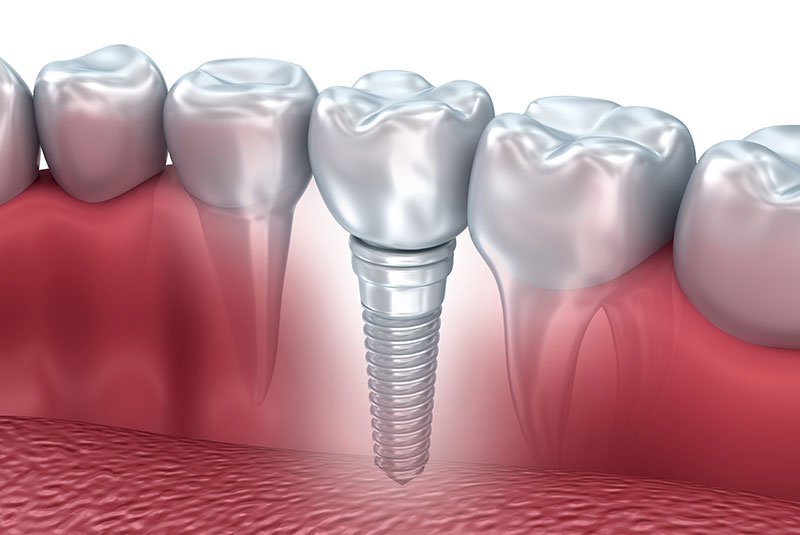
This short visual guide answers the question what does a dental implant look like and walks you through the dental implant process. You’ll learn the three main parts of an implant, what photos, diagrams, and x-rays reveal, how different implant types appear in the mouth, and what to expect at each stage.
What Does a Dental Implant Look Like? The three main parts
The implant (the screw)
The implant is a small, screw-shaped piece that sits in the jawbone. Most implants are titanium or zirconia. They often have a slightly rough surface to help bone grow onto them. From the outside you usually can’t see the implant once gum tissue heals because it is buried in bone and covered by gum.
The abutment
The abutment is the connector that attaches to the implant and holds the crown. It can be metal or ceramic. Abutments change the visible profile by raising the crown slightly above the gum line. Some abutments are shaped to support the gum for a natural contour.
The crown (the visible tooth)
The crown is the part you see. Crowns are commonly porcelain or zirconia and are color-matched to nearby teeth. Good crowns mimic the shape, translucency, and shine of natural teeth so they blend in when you smile.
Close-up visuals: photos, diagrams, and x-rays
Photos (clinical and patient photos)
True-color photos show gum contour, crown shape, and how well an implant matches adjacent teeth. Clinical photos from the dentist often show before-and-after angles, while patient photos show the real-life smile and how light hits the crown.
Diagrams and labeled illustrations
Diagrams simplify the inside view. They label the implant, abutment, and crown and show placement depth in the bone. Diagrams are helpful to see parts you can’t view in a photo.
What x-rays and CBCT scans show
X-rays reveal the implant inside the bone and how bone fits around it. CBCT scans give 3D views of implant position, nearby anatomy, and bone volume. On radiographs implants look like solid screw shapes, while natural roots show different textures and shapes.
Types of implants and how each one looks in the mouth
Single-tooth implant
A Single-tooth implant replaces one missing tooth. Visually it appears like a natural tooth with a single gum margin and matching color. When done well, it’s hard to tell the difference from the real tooth.
Implant-supported bridge
Two or more implants can support a bridge that replaces several teeth. The bridge looks like a row of teeth with no gaps and rests on the gums naturally. Fewer implants are used than the number of teeth replaced.
Implant denture / All-on-4
Fixed full-arch restorations (like All-on-4) look like a complete set of teeth attached to several implants. Removable overdentures snap onto implants and can be taken out for cleaning. Fixed options appear seamless and feel more like natural teeth.
How an implant’s appearance changes over time
Immediately after placement
Right after surgery you may see sutures, swelling, and a temporary crown or healing cap. The area looks different during healing but this is normal and temporary.
After osseointegration and final restoration
Once the implant bonds to bone (osseointegration) and the final crown is placed, the gum shape settles. The final restoration will be polished and color-matched. Over time the implant should blend in with adjacent teeth if oral hygiene is maintained.
Common appearance concerns patients ask about
Will metal show through the gum?
Metal can show if gums are thin or if a metal abutment is used near the front. Solutions include zirconia abutments, thicker gum tissue with a graft, or careful crown design to hide metal.
Color match and translucency
Dental labs match color using shade guides and photos. Porcelain and zirconia can be layered to mimic translucency and surface texture so crowns look natural under different lighting.
Gum recession and black triangles
Gum recession can expose the crown margin and create small dark spaces between teeth (black triangles). Treatments include gum grafts, reshaping crowns, or orthodontic options to close gaps.
What to bring to your consult: photos and examples
Bring close-up photos of your smile, front and side views, and images of smiles you like. Ask to see before-and-after photos from the dentist’s real patients. These visual aids help set realistic expectations.
Looking for implants? How a dental team helps
At your consultation, the dental team can show clinical photos, x-rays, and sample crowns to explain the dental implant process. They will discuss implant materials, abutment choices, and how each option affects appearance. If you want, ask to see examples of cases similar to yours and to review temporary vs final restorations.
Schedule a consult to view photos and get a clear plan for your smile.
Summary: A dental implant has three main visible parts—the implant screw in bone, an abutment connector, and the crown you see. Photos, diagrams, and x-rays each show different details. Ask your dentist for examples during the dental implant process so you know what to expect visually at each stage.